System One lets an agent call Jev inside a short program. It can rank evidence, branch on a result and check the next item without another agent turn. One MCP call returns the findings it needs.
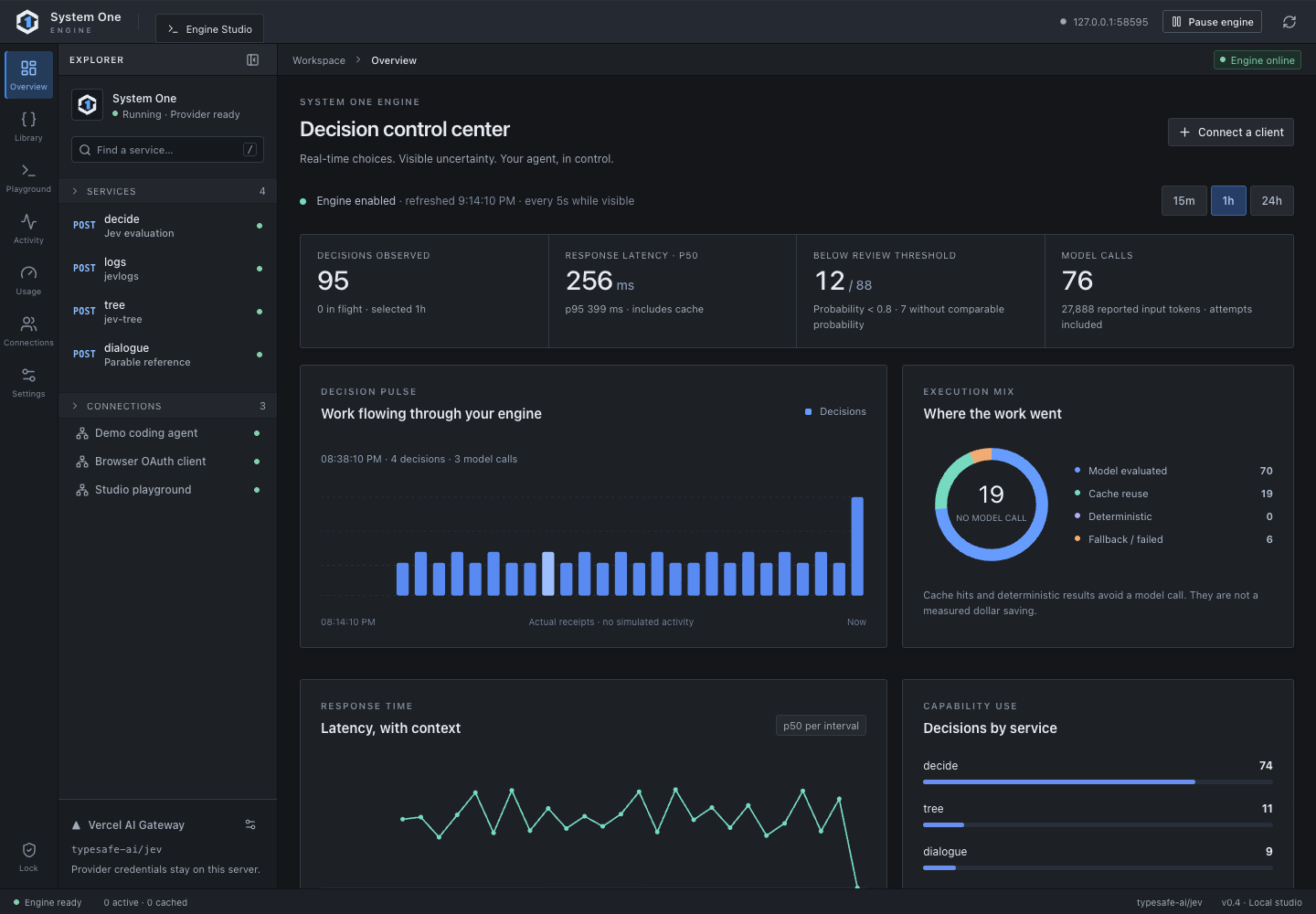
Compare request volume and response times. Inspect uncertain results and identify the connection that made each call. Set limits or pause the engine from the same workspace.
Actual interface with demonstration fixture data. Your app's charts show its own receipts.
ONE PLAN · SEVERAL BOUNDED JUDGMENTS
Your agent can ask Jev as it writes code.
The agent supplies evidence, calls Jev only where judgment helps, and uses ordinary conditions and loops to decide what to check next.
sysone_codeILLUSTRATIVE EXAMPLE
async () => {
  const excerpts = [
    { id: "callback", text: "OAuth callback returned 504 after 12s." },
    { id: "database", text: "No database errors in this request." }
  ];
  const match = await jev.find({
    question: "Which excerpt explains the failed login?",
    sources: excerpts
  });

  if ((match.value.answerExists ?? 0) < 0.7)
    return { next: "inspect more evidence", reviewed: [] };

  const reviewed = [];
  for (const candidate of match.value.ranking.slice(0, 2)) {
    const source = excerpts.find(item => item.id === candidate.id);
    if (!source) continue;
    const verdict = await jev.check({
      claim: "The OAuth callback timed out.",
      evidence: [source]
    });
    reviewed.push({ id: source.id, support: verdict.value.supported });
  }
  return { next: "agent reviews", reviewed };
}
WHAT THIS CHANGES
Find the useful evidence.Jev ranks excerpts the agent already gathered.
Branch on the result.If the evidence is weak, the code stops. Otherwise it checks up to two excerpts.
Return a small result.The agent sees the findings it needs and keeps responsibility for the next action.
One MCP call
This example can make one to three Jev calls inside the code run. Each inner call still uses the connection's scope and allowance.
Working from a file? With separate document consent, the agent can upload it by HTTP and call jev.searchDocuments inside the plan. Only that connection can search it, and it expires after 12 hours. The run returns an ID for inspecting a metadata-only trace.
Illustrative code, not a live evaluation or measured speedup. Jev returns probabilities, and the agent must treat an uncertain result as uncertain. Hosted Code Mode has separate daily execution limits.
ONE MCP CALL A dependent planUP TO 8 Bounded tool callsTYPED Choices, scores, probabilitiesSCOPED Every inner call
THE AGENT WRITES THE PLAN
Let Jev answer the small questions.
Which passage matters? Does it support the claim? Should the agent inspect another candidate? Code Mode lets the agent express that sequence with ordinary conditions and loops. Jev supplies bounded judgments; the agent keeps the final decision and action.
The browser companion and The Infinite Parable show how an application supplies context, uses Jev's answer and keeps control of the result.
COMPUTER USESOURCE PREVIEW
Let Jev choose the next browser step.
A dedicated browser supplies accessible controls and current values. Jev chooses a small next step; the companion returns a screenshot and trace for the agent to review.
Observed controls→Choose the next step→Review the screen
Recorded form runs and six accessibility decision cases are published with their failures and limits.
The game supplies eligible recordings and scene context. System One can recommend a cue or silence. The game retains cue history, spacing and playback authority.
Eligible recordings→A cue or silence→The game decides
An authored-dialogue integration. An independent playthrough study has not established an experience improvement.
Use another agent? Start with its MCP support or call the HTTP API. Users can connect to our hosted MCP endpoint; local engines need a reachable transport for web clients. Check requirements and verification status.
MEASURE THE WHOLE WORKFLOW
More questions can help. Only the result proves it.
Jev's published input list rate makes extra bounded checks practical to try. Code Mode can keep intermediate answers out of the agent's context. We have not measured a full-agent speed, cost or quality gain from Code Mode.
INPUT-ONLY PLANNING EXAMPLE$0.42 vs $30
10,000 calls × 1,000 input tokens at Jev's $0.042/M published rate versus an editable $3/M example rate. This is not a bill or saved cost.
LOCAL CODE MODE FIXTURE1 vs 2 MCP calls
A two-step conditional path used one outer Code Mode call or two direct calls. Local wall time was slightly slower with Code Mode in the latest fixture.
JEV BATCHING DIAGNOSTIC23/24 vs 24/24
One batched request per case made one more label error than two separate requests in a 12-case synthetic test.
The Code Mode fixture uses deterministic dialogue and no Jev inference. The batching result is a separate test, not a Code Mode benchmark. Neither demonstrates savings for a complete agent task. How to compare your own workflow ↗Batched test method ↗
HOSTED CODE MODE · FREE EARLY ACCESS
Give your agent one MCP URL.
Verify your email, connect the hosted MCP, and ask your agent to try a bounded code plan. The engine runs Jev; your account controls which tools it can call. No provider key, payment card or waitlist.